

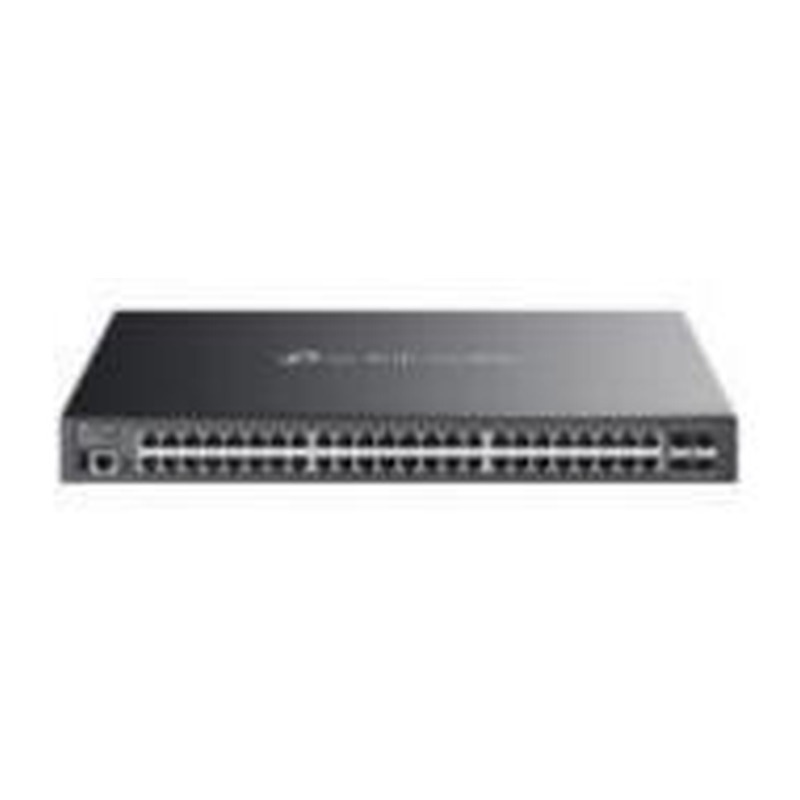
TP-Link Omada SG5452XMPP 48-Port L3 PoE++ Switch
₱67,200.00
Omada 48-Port Gigabit Stackable Lite L3 Managed PoE++ Switch with 4 10G Slots. 60-month manufacturer warranty. VAT-inclusive price PHP 67,200.
Available on backorder
Description
The TP-Link Omada SG5452XMPP is TP-Link’s Omada 48-Port Gigabit Stackable Lite L3 Managed PoE++ Switch with 4 10G Slots. Checkway Electrotech supplies it in the Philippines with a 60-month manufacturer warranty and a VAT-inclusive price of PHP 67,200.
About the TP-Link Omada SG5452XMPP
This listing covers the Omada SG5452XMPP from the TP-Link Omada range. Specifications on this page follow the TP-Link Philippines price list. For the full datasheet, see the TP-Link Philippines website, then compare it with other models in our IT Equipment category.
TP-Link Omada SG5452XMPP Key Specifications
| Ports | 40× Gigabit PoE+ Ports, 8× Gigabit PoE++ Ports (up to 90 W/port), 4× 10G SFP+ Slots, RJ45/ USB Type C Console Port, 1× USB2.0 Port |
| Specifications | 802.3bt/at/af, 770W PoE Power, 1U 19-inch Rack-mountable Steel Case |
| Manufacturer warranty | 60 months |
Features Explained
- Centralized Managed by Omada SDN Controller: Centralized management through the Omada SDN Controller lets you configure and monitor Omada devices from one dashboard.
- Stacking: Stacking lets several switches be managed as a single unit.
- Fast PoE: Fast PoE shortens the time PoE devices take to power up after the switch starts.
- Perpetual PoE: Perpetual PoE keeps connected PoE devices powered while the switch reboots.
- 802.1Q VLAN: VLAN support separates traffic into groups, for example CCTV, staff and guest networks.
- STP/RSTP/MSTP: Spanning tree protocols prevent network loops when you build redundant links.
- IGMP Snooping: IGMP snooping limits multicast traffic to the ports that need it, which helps IP video and IPTV.
- 802.1p/DSCP QoS: QoS prioritizes time-sensitive traffic such as voice and video.
- ACL: Access control lists filter traffic with rules you define.
- 802.1x: 802.1X port authentication only lets approved devices onto the network.
- LACP: LACP combines ports into one logical link for more bandwidth and redundancy.
- SNMP: SNMP lets network monitoring tools read device status.
The TP-Link Omada SG5452XMPP also supports: RIP, OSPF, Static Routing, ERPS, OAM, DDM, sFlow, QinQ, Radius/Tacacs+ Authentication, CLI, Dual Image/Configuration, IPv6.
Where to Use the Omada SG5452XMPP
A stackable L3 PoE++ switch is a strong fit for the core or distribution layer of campuses, hotels, hospitals, factories and large offices that power many cameras and access points while routing between VLANs.
When specifying a switch, count the ports you need today and leave headroom for growth, check the PoE power budget against the devices you plan to power, and confirm the uplink speed to your core or router. Mount rack models in a ventilated 19-inch cabinet and document your VLAN plan before you deploy.
How to Choose the Right Model
Choosing a switch depends on port count, PoE budget, uplink speed and management features. Unmanaged models suit simple networks, while managed models add the VLAN, QoS and monitoring tools that larger sites need.
Deployment checklist
- Count the ports and the PoE devices, then compare the total with the PoE power budget.
- Plan uplinks to the core or router and choose the speed you need.
- Document the VLAN plan before you apply the configuration.
- Mount rack models in a ventilated cabinet and leave space for airflow.
- Label every patch cable and port on the patch panel.
- Back up the configuration after the network is stable.
Complete Your TP-Link Omada SG5452XMPP System
Switches work best with a clean structured cabling system, a managed router or gateway and, for Omada models, the Omada controller. Checkway can design and supply the whole network.
Common Mistakes to Avoid
- Ignoring the PoE power budget when you add more devices.
- Placing the switch in a hot, closed cabinet.
- Skipping the VLAN plan until after the network grows.
- Using one uplink where a second link would give redundancy.
- Forgetting to save and back up the configuration.
Care and Maintenance
Check the fans and ventilation of rack equipment and keep the cabinet clean. Review the firmware release notes before you update, and export the configuration after each change.
Warranty, Pricing and Support
The TP-Link Omada SG5452XMPP carries a 60-month manufacturer warranty. The price shown includes 12% VAT. Checkway Electrotech is based in Tagum City, Davao del Norte, and serves homes, businesses and government offices across the Davao Region. The business is led by a senior electrical engineer with more than 30 years of experience in industrial and infrastructure projects, so you can ask us for help with system design, cabling, power and installation planning for CCTV, access control, networking and solar projects.
Omada SG5452XMPP FAQs
How long is the warranty on the TP-Link Omada SG5452XMPP?
It has a 60-month manufacturer warranty.
Is the Omada SG5452XMPP price VAT inclusive?
Yes. The listed price includes 12% VAT.
Can Checkway help me plan an installation with the TP-Link Omada SG5452XMPP?
Yes. Send us your site details and we will recommend a suitable layout, cabling and accessories.
Additional information
| Warranty | 60 months |
|---|---|
| Series | Omada |
Related products
-
Sale!

Fonudar E2208 21.5 In LED FHD Monitor | Full HD Display | Checkway Electrotech
Original price was: ₱3,900.00.₱3,500.00Current price is: ₱3,500.00. -
-
Sale!

TP-Link TL-SG3210 JetStream 8-Port Gigabit L2+ Managed Switch – Smart, Reliable & Scalable Networking
Original price was: ₱6,700.00.₱6,499.00Current price is: ₱6,499.00. -
Sale!
Epson EcoTank L5290 All-in-One Ink Tank Printer
Original price was: ₱17,900.00.₱15,900.00Current price is: ₱15,900.00.
Reviews
There are no reviews yet.